
Windlass Simulation
Windlass Operating Status (128777) and Monitoring Status (128778) are ordinary status instruments. They encode/decode supported properties; the UI is not a physical anchor motor-control panel.
Build a status test
- Add the required windlass status PGN in Generate.
- Set the Windlass Identifier and supported status fields to the scenario you want to simulate.
- Review rode counter/line speed or motor time/voltage/current using the displayed units and canonical properties.
- Choose supported enum/event values rather than guessing bit combinations from a label.
- Configure individual Enable/interval and, only on the intended bench, Enable Sending explicitly.
Manual property values are sufficient for the supported TX path; no dedicated windlass generator is needed. Status fields do not grant a command/actuation capability.
Inspect received status
Use Viewer, source/identifier distinctions and Diagnostics to locate the right instrument. Zero, unavailable measurements and enum statuses have different meanings. A zero counter/current can be valid; an unavailable wire field should not become an implausible engineering quantity.
Interpret results safely
These instruments report simulated windlass status; they do not operate the anchor motor or its interlocks. Check the receiving instrument and follow the physical equipment safety procedures. Stop/F12 ends external Sending.
Illustrated controls
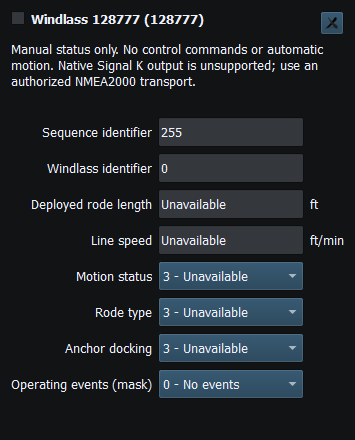
Figure 57. Windlass operating status and rode measurements (PGN 128777). Click to enlarge.
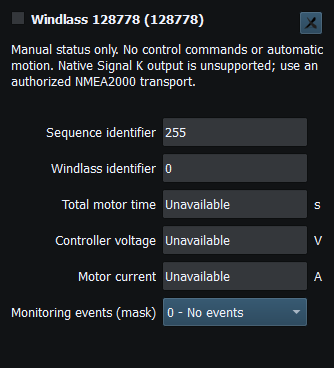
Figure 58. Windlass voltage, current, temperature and monitoring status (PGN 128778). Click to enlarge.
Related topics
Generating NMEA Data · Enable, Dispatch and Sending · Manual Vessel Movement · Autopilot and Route Following · Game Controller Mode · Engine and Transmission Simulation · Weather and Environmental Simulation · AIS Simulation · Connection Troubleshooting · Route Overview · Engineering Units