
Actisense NGT-1
Actisense NGT-1 reception is supported. Outbound behavior has an unresolved corruption issue, so the application intentionally distinguishes Release from Debug.
| Build | Policy |
|---|---|
| Release | RX-only; ordinary TX disabled |
| Debug | Ordinary TX experimental; isolated test network only |
| Both | Active chartplotter route service excluded |
Configure reception
- Stop Sending and choose Actisense in Setup → NMEA2000.
- Select the intended serial port, baud and supported preamble setting for the actual adapter.
- Save and inspect the connection/status and capability notice.
- Use Viewer and Diagnostics for supported incoming data.
Release builds receive only; selecting Actisense does not enable Sending. Debug transmission is experimental because outgoing data can be corrupted. Active chartplotter route requests are disabled in both builds.
Avoid unsafe workarounds
For ordinary transmission, choose another supported output. Do not change baud, framing or instrument values to work around corrupted Actisense output.
Illustrated controls
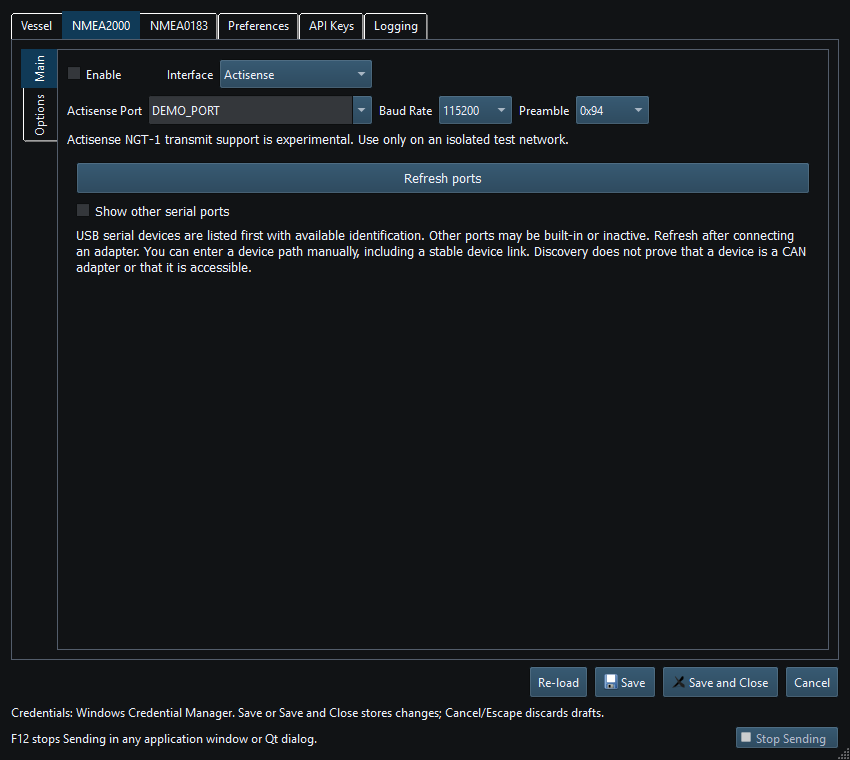
Figure 70. Actisense serial and framing settings in Setup. Click to enlarge.
Related topics
NMEA2000 Overview · NMEA0183 Overview · Network NMEA2000 · SocketCAN · CANable SLCAN · Waveshare USB-CAN-A · Signal K · Device Discovery and Diagnostics · Connection Troubleshooting · Enable, Dispatch and Sending · Route Overview · Engineering Units