
AIS Simulation
AIS instruments simulate supported Class B identity and position messages. They do not operate an AIS radio transponder. Use a designated test identity on an isolated network.
Set defaults for new AIS instruments
- Open Setup → Vessel Identity — Defaults for New AIS Instruments.
- Review simulated MMSI, vessel type, radio callsign and dimensions. Use designated test data on an isolated network; do not transmit another vessel's identity.
- Save deliberately, then create the appropriate supported AIS instrument.
- Inspect its actual property values. Existing widgets and saved Layouts retain their own values; changing Setup is not a bulk rewrite of them.
The simulated MMSI is not the CAN source address or NMEA2000 device NAME. New Part B instruments use supported type/callsign/length/beam defaults; wire-format dimension rounding and canonical configuration precision are separate.
Prepare a supported AIS test
- Select the exact supported message/direction from the capability reference.
- Populate static identity and dynamic position/course/speed/status fields as applicable.
- If Vessel Movement supplies a field, inspect its status and readonly controls; do not treat that as a manual editor failure.
- Review individual Enable/interval and explicit Sending authorization only on a controlled bench.
Supported Class B messages carry different identity/position fields. See the PGN reference. Class A, DSC and NMEA0183 VDM/VDO sentence instruments are not available.
Receive and publish carefully
Viewer updates supported AIS instruments by source and target identity. Signal K publishes supported target mappings; this does not transmit an AIS radio signal. Check the receiving application for the fields it uses.
Review MMSI, callsign, vessel names and coordinates before sharing screenshots, logs or Layouts. Use example identities and positions in support requests.
Illustrated controls
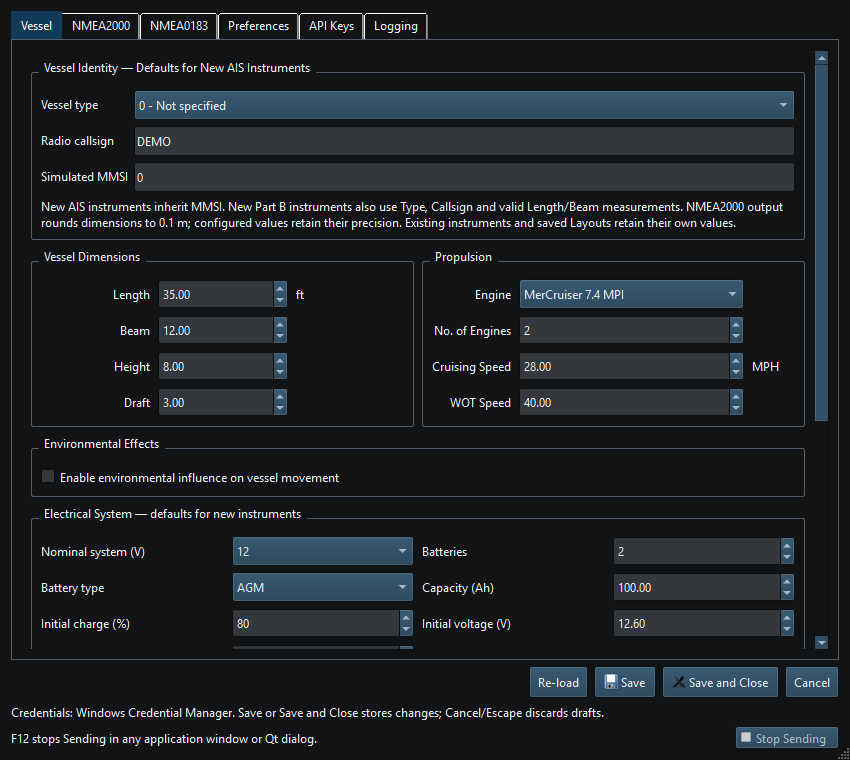
Figure 56. Set defaults for new AIS instruments in Setup; existing instruments keep their saved values. Click to enlarge.
Related topics
Generating NMEA Data · Enable, Dispatch and Sending · Manual Vessel Movement · Autopilot and Route Following · Game Controller Mode · Engine and Transmission Simulation · Weather and Environmental Simulation · Windlass Simulation · Connection Troubleshooting · Route Overview · Engineering Units