
Main Window
The Main Window is organized around category tabs, a Sending toolbar/status, instrument work areas and two property/navigation docks. Treat the status as state feedback, not as a decoration.
Orient yourself
- The category tabs group Navigation, Propulsion, Environment, Tanks, Electrical, Communication, Other and Generate.
- Each category selector adds supported instruments/sources. NMEA2000 entries sort numerically by PGN before alphabetically displayed NMEA0183 entries.
- Property Editor exposes the selected widget's canonical model fields.
- Object Tree locates widgets, instances, sources and formatted properties.
- The Sending toolbar distinguishes stopped, connecting/ready, active and fault states. Read the selected transport's status.
Arrange and inspect
- Select the category you need, then select a widget or its Object Tree entry.
- Expand a tree item to locate a particular property; inspect its value and update time.
- Use View to show or hide the Property Editor and Object Tree docks. The Sending toolbar remains available for external-output control.
- Resize panes to make labels and units legible. Use a larger window for dense multi-field instruments.
Darkeum is the manual's screenshot theme. Existing installations retain their selected theme; six built-ins and external QSS remain available through Setup. A different font, DPI scale or theme can change spacing without changing canonical values.
Use the menus by task
File contains Setup and Exit; Mode selects Viewer or Generate; Layout manages Layouts and Templates. Transmission contains Sending controls. Tools provides logs and Diagnostics. Help opens the manual, About and voluntary Support. The Debug/Test menu is available only in Debug builds.
F1 and F12 remain useful when a window covers the toolbar. Help is modeless; confirmations that can replace data remain explicit. Keep the title/status and current Layout identity visible before destructive operations.
Illustrated controls
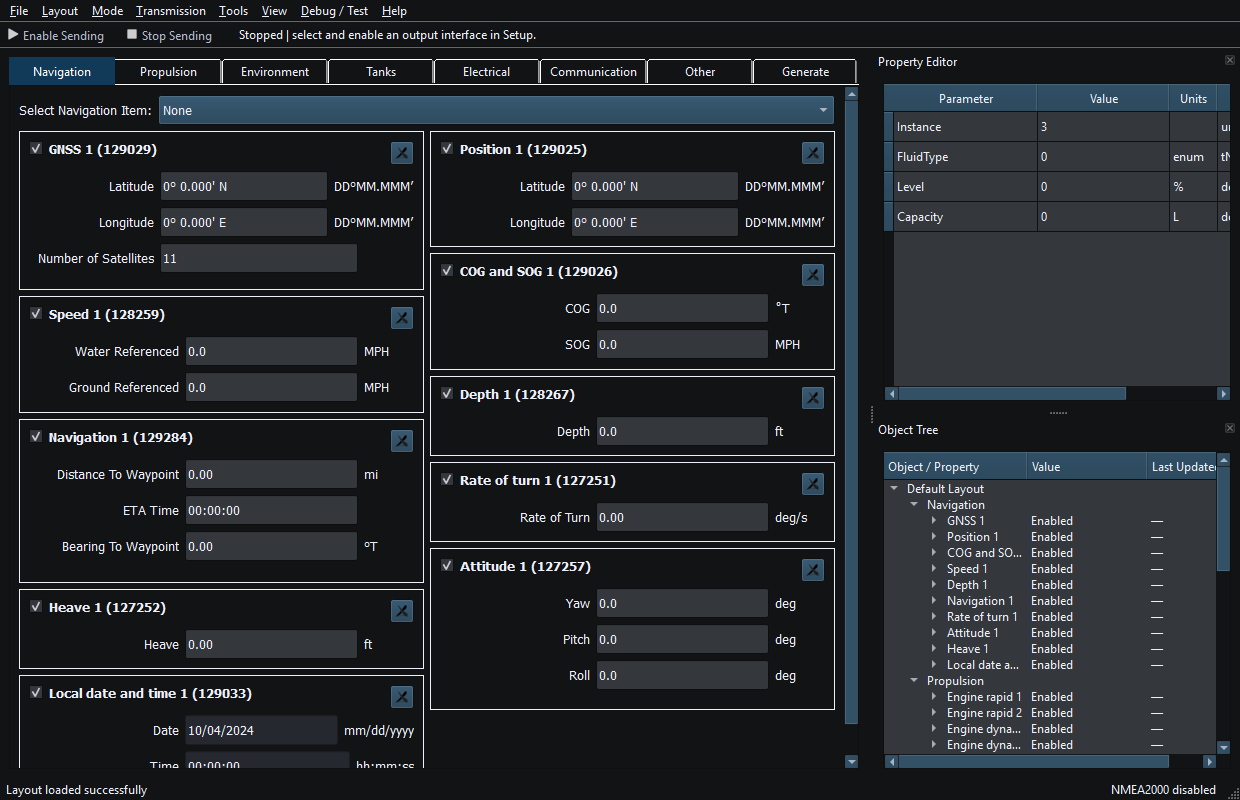
Figure 10. Category tabs, Sending controls, Property Editor and Object Tree in the main window. Click to enlarge.
Related topics
Instruments and Generators · Layout Management · Templates · Property Editor · Object Tree · Themes and Appearance · Keyboard Shortcuts · Connection Troubleshooting · Enable, Dispatch and Sending · Route Overview · Engineering Units