
CANable SLCAN
CANable SLCAN connects compatible SLCAN adapters on Windows and Linux for NMEA2000 reception and transmission. It uses serial framing for 29-bit CAN, not NMEA0183 sentences.
Select and save the adapter
- Stop Sending and select CANable SLCAN in Setup → NMEA2000.
- Use Refresh ports after attaching the device. The selector prioritizes detected USB serial devices and displays available description/manufacturer/VID:PID information.
- Select the actual COM/device path. If discovery is insufficient, enter the usable path manually; descriptive text is not the device path.
- Review Unique CAN device number and Preferred CAN source address. Keep simultaneous node identities distinct.
- Save, then use Connect Selected Device for RX/standby.
The established configuration uses 115200 baud SLCAN serial, 8N1, and 250 kbit/s extended CAN. Adapter firmware must implement the expected SLCAN behavior. Do not substitute a binary USB-CAN protocol merely because it uses a serial USB chip.
Receive or transmit deliberately
Connection alone does not authorize instrument Sending. Use Viewer for supported reception; in Generate review instruments and explicitly Enable Sending. Stop/F12 and mode/transport changes revoke output/service permission. Reconnect explicitly after an abort/fault when status requires it.
The chartplotter route dialog provides its own discovery and retrieval controls. General device discovery in Diagnostics is not available for serial CAN adapters.
Recover access problems
Missing/disconnected device: check the cable, refresh and reselect. Access denied/busy: close another serial application and verify OS permissions. On Linux, membership/permissions for the serial device may require an administrator-managed change and a fresh login session; this Help does not modify groups or udev rules. Do not repeatedly Save a stale port to conceal a physical disconnect.
Illustrated controls
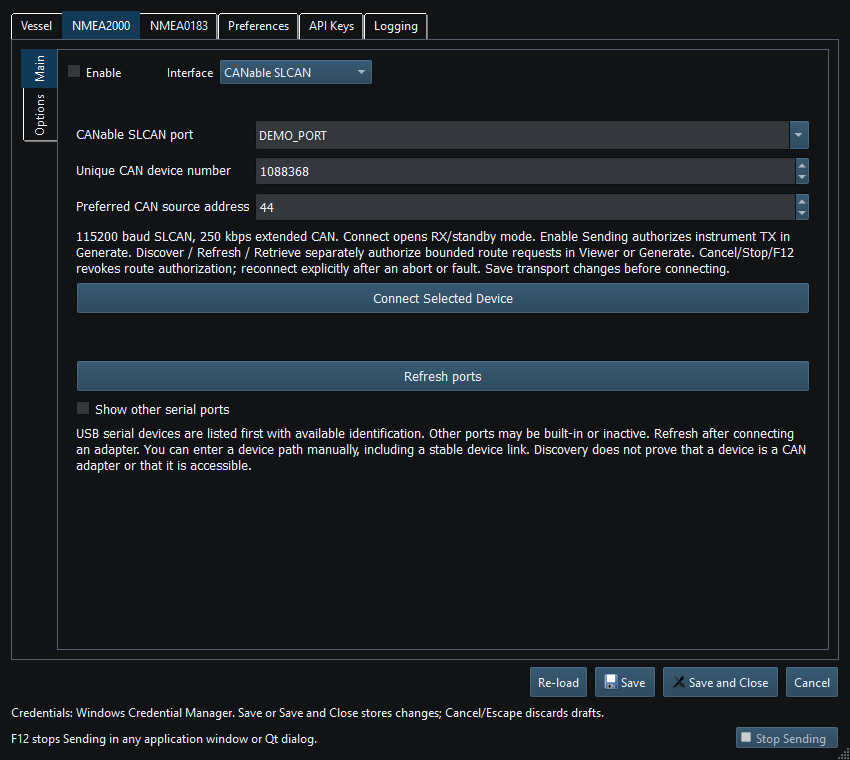
Figure 68. CANable SLCAN port and device identity settings in Setup. Click to enlarge.
For Linux serial access failures, see Linux Serial Port Permissions.
Related topics
NMEA2000 Overview · NMEA0183 Overview · Network NMEA2000 · SocketCAN · Waveshare USB-CAN-A · Actisense NGT-1 · Signal K · Device Discovery and Diagnostics · Connection Troubleshooting · Enable, Dispatch and Sending · Route Overview · Engineering Units