
Selecting Chartplotter Routes
Select Chartplotter Route uses complete received route snapshots and, on eligible interfaces, a bounded active route client. The target must provide the requested NMEA2000 route service.
Choose a complete received route
- Receive traffic through the configured interface. Passive assembly retains source identity, database/route information, ordered waypoints and completeness.
- Open Vessel Movement → Autopilot → Select Route → Select Chartplotter Route when available.
- Review the device, route and completeness information. An incomplete or invalid route is not selectable for following.
- Select the intended complete snapshot and confirm. Check the pending route name and waypoint count.
- Activate Autopilot later, explicitly, after readiness checks. Selection does not start movement or Sending.
Retrieve a supported chartplotter route
- Configure a supported RX/TX-capable interface and establish reception. Check that the device identity is the intended chartplotter.
- Open the route dialog. Use its explicit device discovery/refresh controls when needed; discovery itself is a bounded external request operation.
- Review product/model metadata together with the diagnostic NAME and source address. Never identify a device solely by a reused address.
- Authorize the displayed route-service operation. Retrieve the offered catalogue/route with the existing bounded sequence.
- Wait for completion or a meaningful error. Select a complete route separately; retrieval alone does not choose it for execution.
Axiom route retrieval uses Group Function requests and correlated route/waypoint responses. Database lists, route lists, waypoint catalogues and Navigation Route/Waypoint Information are different services; a PGN 129285 response alone is not proof of saved-route database enumeration. Counts are checked, waypoint IDs need not be contiguous, and requests do not guess selectors or paginate without the supported sequence.
Connection and target compatibility
Network NMEA2000 supports Axiom route retrieval through the compatible bridge/client connection. SocketCAN, CANable SLCAN and Waveshare expose the route client; the target must support its request/response service. Actisense active route service is disabled in both builds.
Cancel, Stop/F12, identity changes, disconnects, invalid responses and timeouts end the operation. Reconnect and authorize a new request when needed. Retrieval does not edit stored routes or activate Follow/Goto/Track.
Illustrated controls
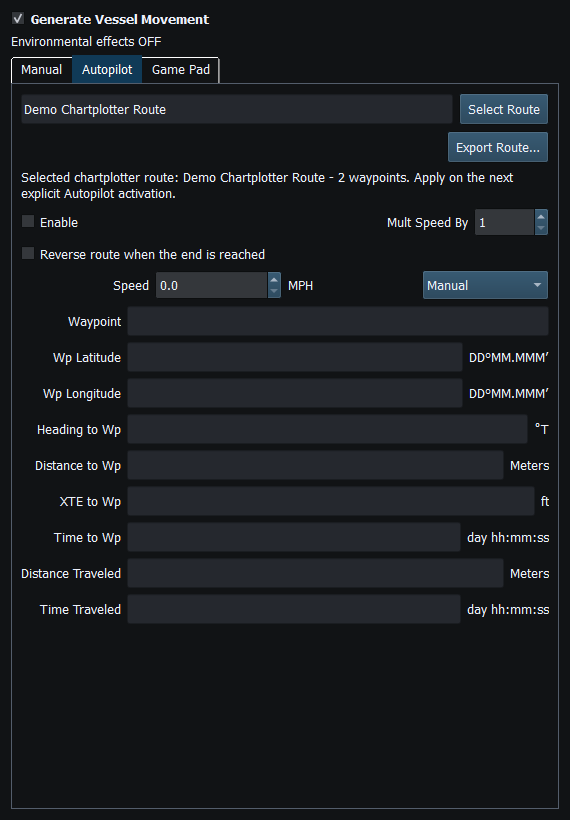
Figure 79. Select a complete received route for the next Autopilot run. Click to enlarge.
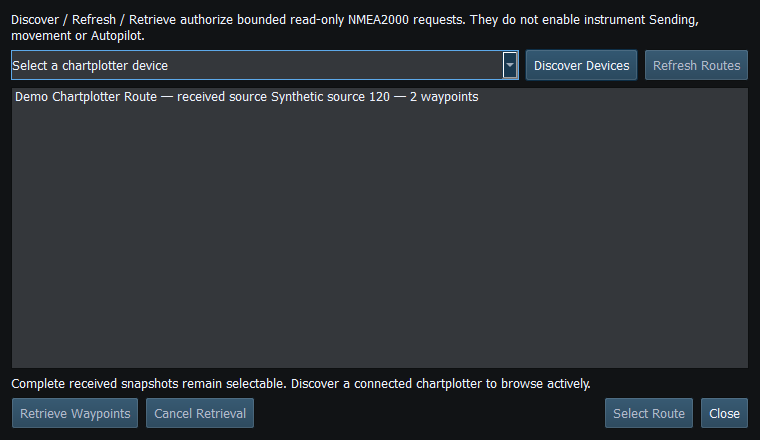
Figure 80. Review available routes and completeness. Discovery and retrieval use their own controls. Click to enlarge.
Related topics
Route Overview · GPX/KML Import · GPX/KML Export · Route Requests and Authorization · Navigation Measurements · Connection Troubleshooting · Enable, Dispatch and Sending · Engineering Units